
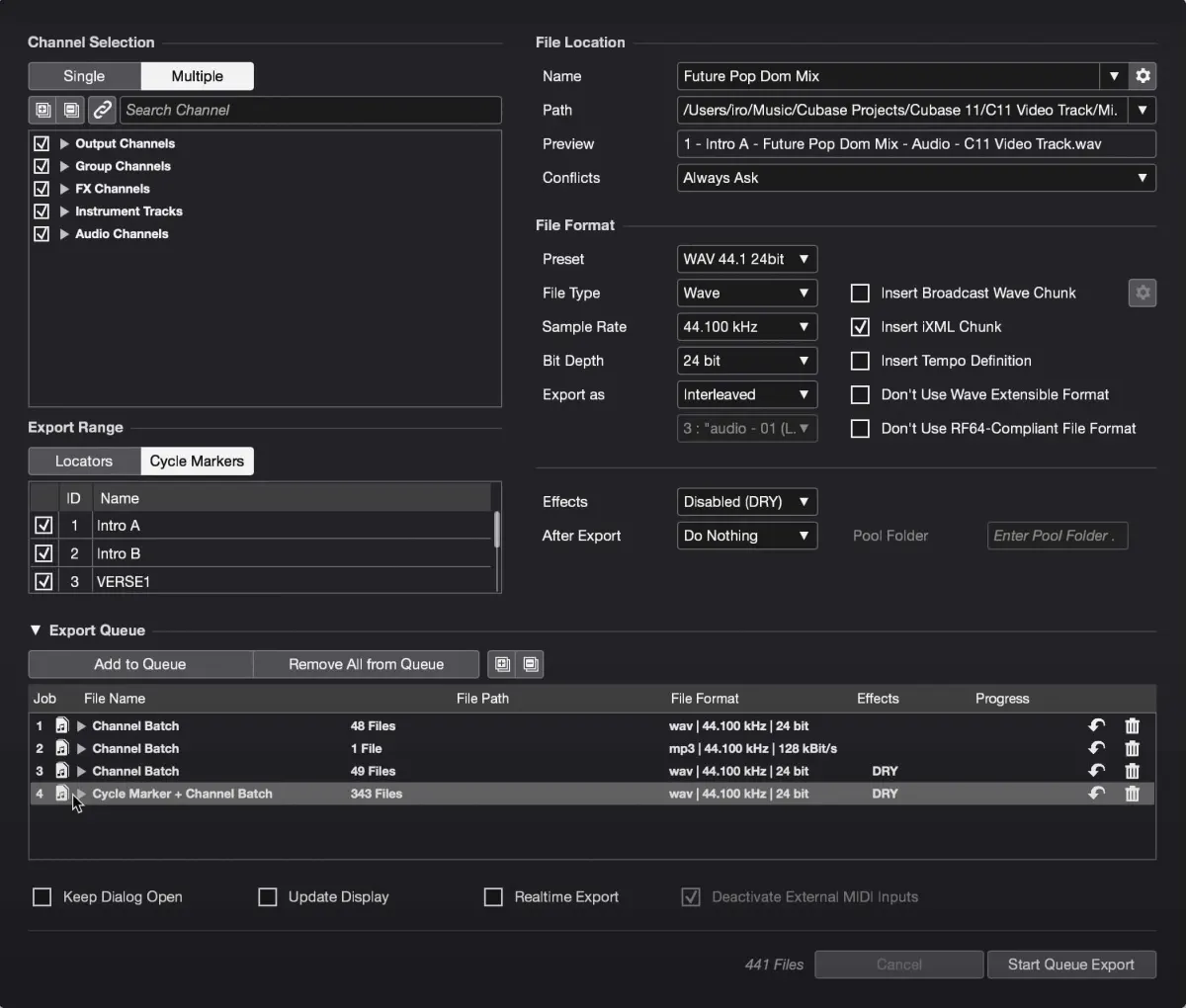
6 easy steps to exporting stems in Cubase for Professional Online Mixing and Mastering Services.
- Go to the File.
- Choose Export.
- Audio Mixdown
- Entire session
- Select all the channels for exporting
- Start Que Export
After exporting your stems you can then upload your zip file here at Audiomixingmastering.com/upload for professional online mixing and mastering services for an affordable rate.
Listen to our before and after samples here at Audiomixingmastering.com/samples to hear why we are #1 worldwide.
Ready for the Next Step
With your Cubase stems bounced and named, online mixing services can take over from anywhere in the world, send WAVs at the session's native sample rate and include tempo and key in the notes.
Before you send stems to an engineer, keep every track starting from the same bar, use clear names like Kick, Bass, and Lead Vocal, and export at the project's native sample rate and bit depth. Consistent start points and naming let anyone drop your stems into a fresh session and have the arrangement line up on the first try.